

“Our website started displaying garbled text today. We restored an earlier backup, but now the orders have gone back to an earlier date too.”
That was the urgent request we received.
The client operated an online store built with WordPress and WooCommerce. When the website developed a display issue, their operations team attempted to restore a backup. During that process, they selected the database for restoration as well.
They then discovered that recent orders were missing from the admin dashboard. Those records were needed for shipping, customer inquiries, and after-sales support. Concerned about the missing information, the client contacted us for help.
The immediate priority was to establish what data could be recovered and avoid overwriting any remaining order records.
A Display Issue Became an Order Data Problem
When we took over, the most recent order shown in the dashboard was dated October 15. The incident took place on November 6.
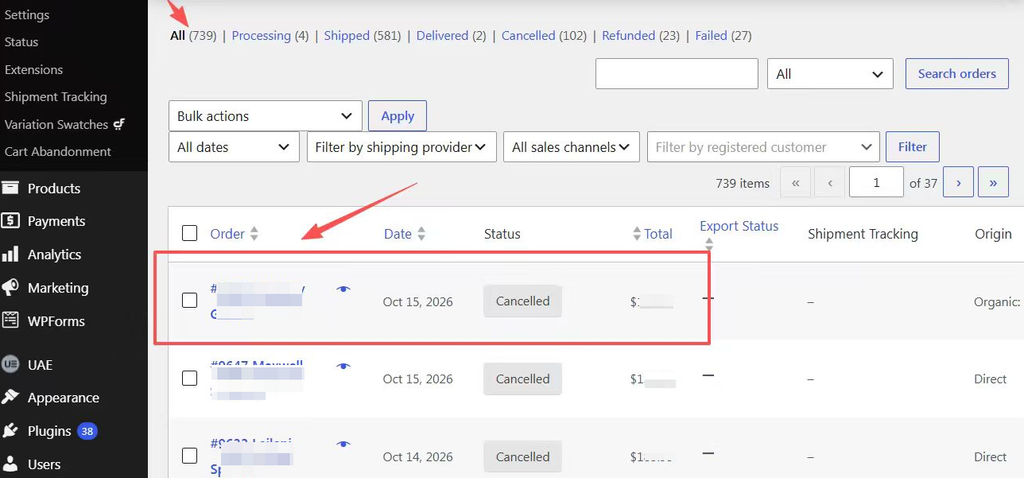
Figure 1: After the backup restoration, the latest order displayed was dated October 15. More recent orders were missing from the list.
For an active store, this meant the operations team could no longer rely on the dashboard alone to check recent transactions. Orders awaiting shipment, completed orders, and refund cases all needed verification.
We first established what had been restored, which backup had been used, and whether new orders had arrived after the rollback.
That last question was particularly important. If the store had continued accepting orders, another database restoration could recover older records while overwriting newly created ones.
We needed to verify the recovery scope before attempting another restoration.
Step 1: Establish the Recovery Scope and Preserve Existing Data
We reviewed the backups listed in the WordPress backup plugin.
The latest available backup there was dated October 15, matching the date shown in the order list. This was an important clue: the restoration had replaced the order database with an older version.
We temporarily enabled maintenance mode to pause normal storefront ordering and asked the operations team to stop further restorations, updates, and backup cleanup.
The current database also needed to be preserved separately, particularly any orders created after the accidental rollback.
These steps protected the data still available and provided a basis for recovery and comparison.
Step 2: Find a More Recent Database Backup
The absence of newer backups in the WordPress plugin did not mean no newer backups existed elsewhere.
Checking the server management panel revealed daily database backups. The most recent was from November 5.
This provided a much more recent recovery starting point than the October 15 backup.
We did not immediately restore it over the live website. Instead, we imported it into a separate temporary database to check whether it contained the missing orders.
During verification, we encountered another detail: an initial query against the older order storage returned no records. That did not mean the backup contained no orders. Checking the dedicated order tables used by WooCommerce revealed historical orders from November.
A backup file existing, importing successfully, and containing the required orders are three separate things to verify.
Step 3: Check for Recoverable Changes After the Backup
The November 5 backup still preceded the incident. Transactions between the backup and the accidental restoration required further investigation.
We therefore checked the MySQL binary logs, which record database changes.
These logs can provide a way to recover changes made after a backup. However, replaying everything without checking the boundaries could also repeat the accidental restoration itself.
We identified log entries consistent with the restoration and examined transaction times around the backup. This helped establish the boundaries for potential recovery.
We also checked available disk space and memory. Recovery work must account for the production server’s resources: temporary files and testing should not create a second outage by exhausting storage or memory.
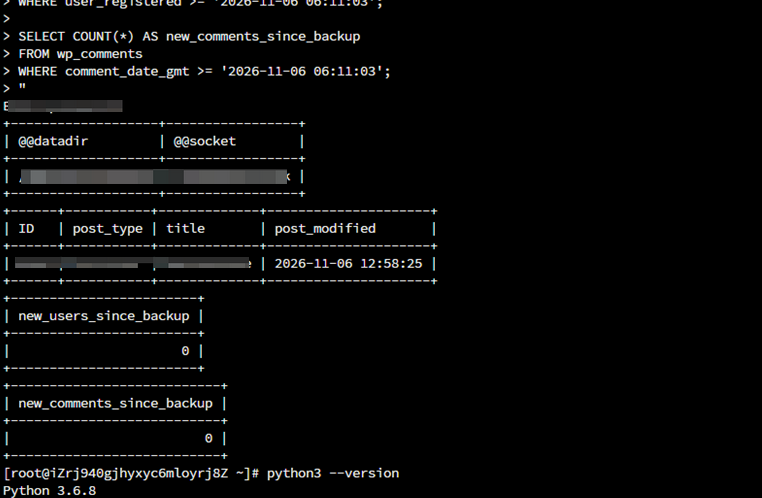
Figure 2: Database logs recorded table deletion and creation events during the restoration, helping us distinguish normal business activity from the subsequent overwrite operations.
Restored Orders Still Need Verification
The emergency work took approximately three hours. Changes in the order list before and after recovery provided an important way to check the result.
However, orders reappearing in the dashboard did not, by itself, confirm that every record had been reconciled.
Further checks were needed to establish the date range covered, verify recent orders and key statuses, and identify any gaps using payment notifications, order emails, and shipping records. Orders received after the accidental rollback also needed separate verification.
The client needed usable business records to continue processing orders.
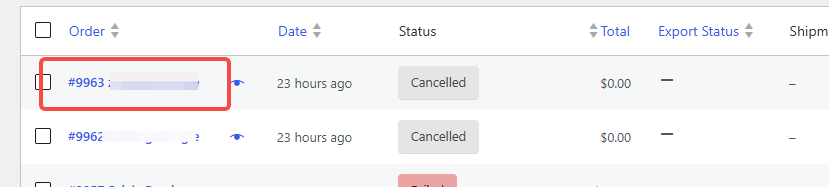
Figure 3: November orders that had been missing from the dashboard were visible again after recovery, allowing their details and processing statuses to be checked.
A Team Without In-House Technical Staff Needs Someone to Turn To
After the incident, the client asked us about ongoing technical support.
They did not need new features developed every month. Their more immediate need was access to someone who could answer questions, investigate unfamiliar errors, and advise on important actions such as updates and backup restoration.
Website maintenance and technical support can address those needs through:
- Guidance on using existing website features.
- Troubleshooting and routine fixes when features stop working.
- Advice on the scope and impact of updates or restoration.
- Regular checks of backups, storage, and key purchasing workflows.
- Assessment of incidents that require work beyond routine maintenance.
These needs may not arise every day. But when they do, having a clear support arrangement helps the team respond systematically and reduces the risk of making the situation worse.
WordPress and WooCommerce Technical Support
Alauda Growth provides one-off troubleshooting, emergency assistance, and ongoing technical support and maintenance for WordPress and WooCommerce websites.
If your website has display errors, malfunctioning features, or missing order records after a backup restoration, tell us when the issue started, what actions have already been taken, and the current condition of the site. We will assess the problem and available data before confirming the scope, schedule, and cost of the work.
For teams without in-house technical staff, monthly support can also cover day-to-day guidance, routine maintenance, and assistance with existing functionality.
Our role is to help you understand the problem, carry out the agreed work, and clearly explain the outcome and any remaining issues.
Comments