

How Shopify’s updated Collections helped us resolve discount conflicts without unnecessary development or ongoing maintenance.
A furniture brand was preparing to establish long-term partnerships with interior designers. The arrangement was straightforward: approved designers could purchase furniture directly from the brand’s Shopify store and receive an exclusive 30% discount.
However, the brand already had an existing promotional strategy for retail customers, including a selection of clearance products permanently discounted by 40%.
This created two challenges:
- How could designers receive their exclusive 30% discount without receiving additional discounts on already-reduced clearance products?
- How could the brand prevent designer discounts from being combined with promotions intended for regular customers?
At first glance, this seemed like a relatively simple requirement. Shopify already offers discount codes, automatic discounts, customer segmentation, and dedicated B2B pricing features.
But as we evaluated the available solutions, we found that having more features did not necessarily make the problem easier to solve.
Ultimately, we decided against Shopify B2B and avoided installing any third-party discount apps. Instead, we used Shopify’s updated Collections functionality, together with native product discounts and customer segments, to build a simpler system designed for easier long-term maintenance.
The experience also changed how we think about using Shopify Collections to manage business rules beyond product merchandising.
01. Why Can a Simple 30% Discount Become a Problem?
First, it’s important to understand the difference between two pricing mechanisms in Shopify.
Merchants can set a product’s selling price (Price) and original comparison price (Compare-at price) directly in the product settings. They can also create additional promotions using Shopify’s Discounts functionality.
These two approaches are not the same.
Shopify’s official discount documentation distinguishes between sale prices configured at the product level and discounts applied in the cart or at checkout.
Consider a piece of furniture with an original price of $1,000, currently offered at 40% off as part of a clearance sale.
| Price type | Amount |
|---|---|
| Compare-at price (Original Price) | $1,000 |
| Price (Current Selling Price) | $600 |
| Price after an additional 30% designer discount | $420 |
This is where the problem begins.
Shopify’s standard percentage discounts are calculated using the current selling price, rather than the original compare-at price.
If we simply created a 30% discount code covering all products, an approved designer could purchase this clearance item for $420.
That represents a total reduction of 58% from the original price, rather than the intended 30% designer discount.
Disabling discount combinations would not solve this particular problem because the product’s existing sale price is not a separate Shopify Discount.
We therefore needed more than a storewide 30% discount code.
Regular products should qualify for the designer’s 30% discount. Clearance products already discounted by 40% should retain their existing sale prices. Designer discounts must also remain separate from other retail promotions.
Additionally, only approved designers should be eligible to use the offer, rather than anyone who happens to obtain the discount code.
02. Our First Consideration: Shopify B2B
Shopify provides a native B2B system with company accounts, dedicated markets, price catalogs, and business purchasing settings.
These capabilities are valuable for wholesalers, distributors, and merchants managing ongoing relationships with business customers.
Naturally, Shopify B2B was one of the first solutions we considered.
During our evaluation, we created a test designer company account and explored configuring a dedicated market and pricing catalog.
However, we quickly discovered that the solution was more complex than the client’s actual requirements demanded.
First, Shopify B2B requires merchants to organize business customers through Companies and Company Locations. Even when the customer is an independent designer, an appropriate B2B account structure is still required.
Second, designers would need to purchase under their B2B customer identity to access the corresponding prices and checkout settings. This differs from the familiar retail experience of entering a discount code during checkout.
There were also payment considerations.
According to Shopify’s official B2B requirements and considerations, accelerated checkout methods such as Shop Pay, Apple Pay, and Google Pay are not supported for B2B orders.
For a brand that values a convenient retail shopping experience, this is an important trade-off.
More importantly, using Shopify B2B does not automatically eliminate conflicts between different pricing and discount mechanisms.
Percentage-based catalog adjustments still require merchants to consider which product prices serve as their calculation basis. Fixed prices offer more precise control but introduce additional pricing management.
Existing retail promotions and B2B prices also need appropriately configured eligibility rules.
For businesses that require different company-specific prices, purchasing permissions, payment terms, or other wholesale capabilities, these additional configurations can be entirely justified.
But that wasn’t the situation here.
The furniture brand simply wanted approved designers to receive exclusive pricing while continuing to use the existing storefront and purchasing experience.
We didn’t want to introduce an entire business purchasing system just to enforce one discount rule.
So we returned to Shopify’s native discount functionality.
03. Native Discounts Were Simple. Product Exclusions Were Not.
Shopify’s Amount off products feature allows merchants to apply percentage-based discounts to selected products or collections.
This meant we could create a 30% designer discount and restrict it to products that were not part of the clearance sale.
Why use a product discount instead of an order discount?
Because we needed to determine which individual products qualified for the promotion, rather than apply a percentage reduction to the entire shopping cart.
That addressed the fundamental pricing problem, but introduced another question:
Which products should qualify for the designer discount, and how should that list be maintained over time?
The most straightforward approach would be to manually select every non-clearance product.
However, this creates an ongoing maintenance burden.
The brand regularly adds new products, and some full-price items may eventually move into clearance.
If every change to the clearance assortment also requires someone to update a separate designer discount list, even a small oversight could result in unintended discount stacking.
Another approach would be to use Product Tags.
For example, merchants could assign a clearance tag to discounted products and create an automated collection that excludes products with that tag.
This was already possible in older versions of Shopify and remains a reasonable solution for many stores.
But it has a limitation in situations where a merchant already maintains a dedicated Clearance collection through a combination of conditions or manual product selection.
The designer discount would still require a separate set of filtering rules intended to represent the same group of products.
What we really wanted was simpler:
Reuse the existing Clearance collection directly, instead of maintaining another definition of what qualifies as a clearance product.
04. What Changed with Shopify’s 2026 Collections Update?
On July 16, 2026, Shopify announced Collections now support multi-source and variants.
This update significantly expanded how merchants can create and manage product collections.
Previously, Shopify collections were primarily built through manually selected products or automated conditions.
The updated Collections system allows merchants to combine multiple sources, including conditions, manually selected products, other collections, and exclusions.
In its official announcement, Shopify highlighted the opportunity to avoid:
“workarounds such as duplicate lists or third-party apps”
This is particularly relevant for merchants managing more complex product assortments and promotional rules.
One of the most useful additions is the ability to reference another collection directly as an inclusion or exclusion source.
Consider a store that already maintains a Clearance collection using tags, inventory conditions, or manually selected products.
With the updated system, another collection can reference the existing Clearance collection without duplicating all of its underlying conditions.
When the products in the source collection change, dependent collections can update their membership accordingly.
Shopify’s developer documentation, Use the new collections model, explains these capabilities in more detail, including the ability to exclude products based on another collection.
The significance of this update goes beyond creating more flexible product categories.
Collections can now serve as reusable components within a merchant’s broader business rules.
Instead of treating each collection as an independent list of products, merchants can create relationships between collections and reuse those relationships across supported workflows.
This was exactly the capability we needed.
05. Our Final Solution: Three Layers of Discount Control
We ultimately kept the brand’s existing product prices and avoided introducing a separate pricing system.
The solution consists of three independent but complementary layers.
Layer 1: Control Product Eligibility Through Collections
We retained the existing Clearance collection and created a second collection:
Non-clearance
Its logic was straightforward:
Non-clearance = All Products − Clearance
In other words, the collection includes the intended regular product assortment while excluding products belonging to the Clearance collection.
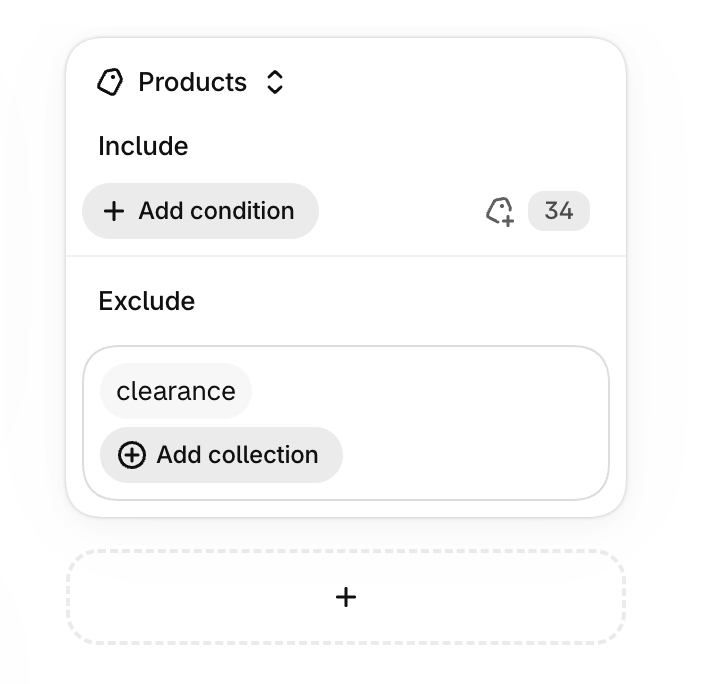
Figure 1. Shopify’s updated Collections allow us to exclude the existing Clearance collection directly, reducing the need to maintain a separate clearance exclusion list for designer discounts.
We then configured a 30% Amount off products discount and restricted it to the Non-clearance collection.
This allows regular products to receive designer pricing while clearance products retain their existing sale prices.
| Product category | Retail price | Designer price |
|---|---|---|
| Regular product | $1,000 | $700 |
| Clearance product | $600 | $600 |
These prices are illustrative examples, not actual customer product data. The examples assume no other discount is applied.
The key benefit is that the Clearance collection remains the primary place where the brand manages its clearance assortment.
When a product enters Clearance, the exclusion relationship removes it from the eligible Non-clearance range.
When a product leaves Clearance, it can become eligible again, provided it still matches the inclusion rules of the Non-clearance collection.
The merchant no longer needs to maintain a second, independent list of clearance exclusions specifically for designer discounts.
Layer 2: Control Customer Eligibility Through Customer Segments
Defining eligible products solves only half of the problem.
The next question is:
Who should be allowed to use the designer discount?
The brand needs a list of approved design partners.
Using that list, corresponding customer profiles can be created or updated in Shopify and organized into a dedicated Customer Segment.
For example, an approved designer could receive a consistent customer tag, which would then be used as a condition for the segment.
The discount’s customer eligibility can then be restricted to that segment.
Shopify’s Customer Segmentation documentation explains how merchants can create dynamic customer groups using rules based on customer information and attributes.
This approach offers two important advantages.
First, obtaining the discount code alone does not make an ordinary shopper eligible to redeem it.
Second, the merchant can manage future partnerships without repeatedly recreating discount rules.
When a new designer is approved, the merchant can add that customer to the eligible group. When a partnership ends, the corresponding eligibility can be removed.
Compared with creating a separate discount for every designer, this provides a more manageable foundation for a growing partner program.
Layer 3: Prevent Stacking Through Discount Combination Rules
With product eligibility and customer eligibility defined, one final condition remained:
The 30% designer discount must not be combined with promotions intended for regular customers.
For example, the brand might run a seasonal 20% off campaign or an automatic order discount available to retail shoppers.
Allowing those promotions to combine with the designer discount could reduce prices beyond the intended level.
We therefore configured the designer discount’s Combinations settings to prevent it from combining with other product discounts, order discounts, and any shipping discounts that should remain mutually exclusive.
Shopify’s official Combining discounts documentation explains how these combination settings work and how eligible discounts are calculated when multiple promotions are available.
One important distinction is that preventing discounts from combining does not necessarily give the designer discount priority.
When multiple non-combinable offers are eligible, Shopify can select the most advantageous applicable discount outcome for the cart.
Therefore, if a merchant requires the designer’s 30% offer to take priority over every retail promotion, the eligibility and scope of those other promotions must also be reviewed.
Together, these three layers establish clear rules:
- Product eligibility: Which products qualify for designer pricing?
- Customer eligibility: Which customers are authorized to use the discount?
- Combination rules: Which other promotions, if any, can be used alongside the designer offer?
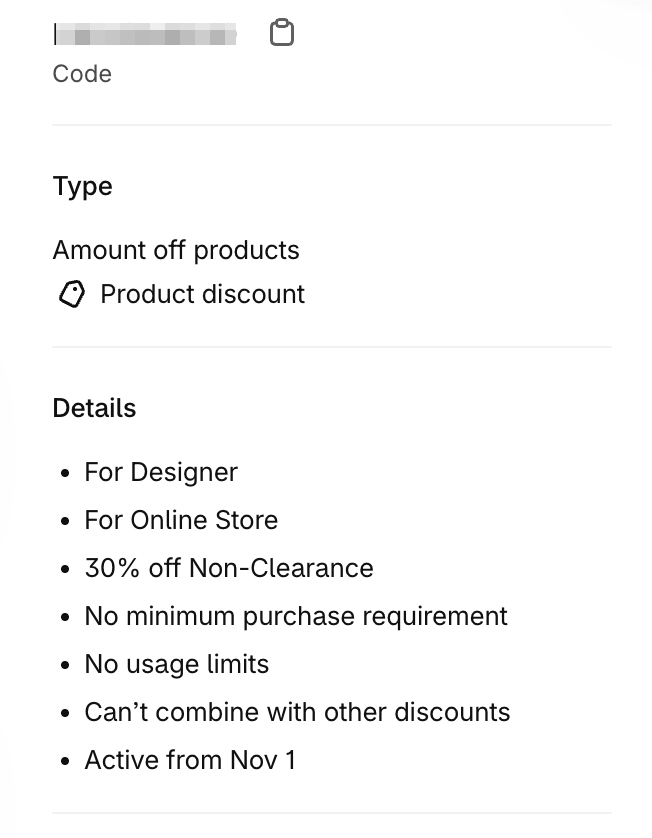
Figure 2. The final Shopify discount configuration restricts the 30% offer to the approved Designer customer segment and Non-clearance products, with discount combinations disabled.
All three layers were implemented using Shopify’s native capabilities.
No additional discount app was required. We did not need to change the store’s existing retail prices, introduce B2B company accounts, or modify its standard purchasing workflow.
06. The Real Efficiency Gain Wasn’t Just Fewer Clicks
When comparing different solutions, it’s easy to focus on how quickly each one can be configured.
Manually selecting products, applying tags, or referencing another collection may not seem dramatically different during initial setup.
But for a Shopify store that operates continuously, initial configuration is only a small part of the total workload.
The more important question is what happens afterward.
As new products are added and clearance assortments change, will the merchant need to update the same information in multiple places?
If so, even a seemingly simple solution can introduce unnecessary work and operational risk over time.
The updated Collections model helps address this by allowing existing product groups to be reused as components of other rules.
In our project, Clearance serves as the primary source for managing clearance products, while Non-clearance reuses that information through an exclusion relationship.
This removes the need to maintain two separate, corresponding product lists.
Meanwhile, designer eligibility is managed through a Customer Segment rather than being mixed into the product filtering logic.
The discount combination settings independently control whether other promotions can be applied.
This design doesn’t eliminate all manual work.
The merchant still needs to maintain the Clearance collection accurately and keep the approved designer group up to date.
However, it reduces the need to maintain the same business information repeatedly across different configurations.
For brands that regularly update their products and promotions, this can be more valuable than saving a few minutes during the initial setup.
07. Where This Approach Has Limitations
Although this solution addresses the client’s main requirements, it is not a universal answer to every discount scenario.
First, the Clearance collection must accurately represent the products that should be excluded.
If a product has a lower selling price and a Compare-at price but is not included in Clearance, it could still receive the additional 30% designer discount.
For products discounted by only 20%, the merchant must decide whether designers should receive their standard 30% offer or whether those products should also be excluded.
That is a pricing policy decision, not something that should be determined solely by whether a Compare-at price exists.
Second, disabling discount combinations does not guarantee that the designer discount will always take priority.
Shopify may select the most favorable eligible discount outcome when different promotions cannot be combined.
Merchants running storewide automatic discounts, seasonal campaigns, or other promotions should therefore review how those offers interact with designer pricing.
Third, customer segments depend on accurate customer records and identity matching.
As Shopify explains in its Discount codes FAQ, discounts restricted to specific customer segments generally depend on existing customer profiles.
A newly approved designer should therefore be added to the customer database and assigned the appropriate eligibility before attempting to use the discount for the first time.
Fourth, excluding one collection does not automatically mean every future product will enter the eligible collection.
The products included in Non-clearance still depend on its inclusion sources.
If the inclusion source relies on manually selected products, newly added items might require manual inclusion.
Automatic updates for new products depend on configuring an inclusion source that can match those products dynamically.
Finally, merchants managing different discount eligibility across individual product variants need to consider the scope of collection membership and discount application.
Shopify’s updated Collections support variant-level grouping, but the configuration should still be tested against the store’s specific product structure.
These limitations don’t make the approach unreliable. They simply highlight the importance of clearly defined operational rules and appropriate checkout testing.
A maintainable discount system should not only calculate the correct price today. It should also remain understandable and manageable as the business changes.
08. Conclusion: A More Complete System Isn’t Always the Better Solution
Throughout this project, we considered several possible approaches, including Shopify B2B, standard order discounts, manually selected product exclusions, and tag-based collections.
None of these approaches is inherently wrong.
Shopify B2B remains valuable for merchants who need company accounts, differentiated pricing, purchasing permissions, or payment terms.
Product tags and traditional automated collections also continue to serve important purposes in Shopify stores.
But for this particular project, where the primary requirements were to control designer eligibility, exclude clearance products, and prevent promotional stacking, Shopify’s updated Collections combined with native discounts and customer segments offered a more direct solution.
The most useful lesson from this experience isn’t how to create a 30% discount.
It’s this:
Before choosing a technical solution, define the business rules that actually need to be enforced. Then look for the simplest approach that can enforce them reliably and remain easy to maintain.
As Shopify continues expanding its native capabilities, merchants have more opportunities to solve operational problems without introducing additional apps, custom development, or unnecessary complexity.
For brands and their technical partners, the goal shouldn’t be to use the greatest number of features.
It should be to meet real business requirements while keeping both the system and its long-term operating costs under control.
Comments